
Screen Clipper is a free, lightweight portable screenshot tool for Windows designed to quickly capture a selected portion of the desktop. Its simple interface lets you position a capture window over the area you want to save, resize the selection, and confirm the capture with a check mark button.
With an extracted size of approximately 204 KB, Screen Clipper was an extremely small utility that could be carried on a USB flash drive and used without a traditional installation. The original project is no longer actively maintained, but an archived project page and a last-known copy of the software are preserved here for historical and archival purposes.
Screen Clipper | Portable Screenshot Capture Tool
What Was Screen Clipper?
Screen Clipper was a small Windows screenshot utility focused on one simple task: capturing a selected area of the screen.
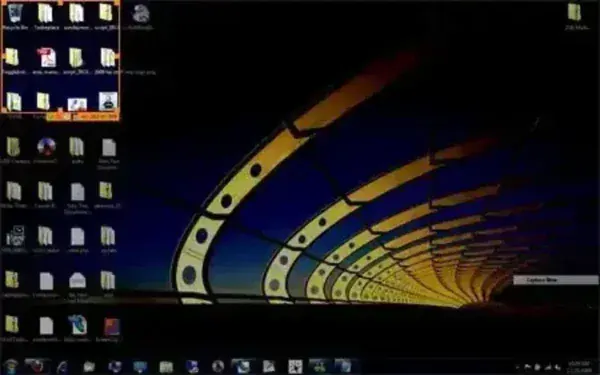
Instead of providing a large collection of editing and annotation features, the application used a straightforward capture interface. After launching the program, users could position the capture window over the desired portion of the desktop, adjust its dimensions, and confirm the selection to take the screenshot.
Its extremely small footprint and standalone operation also made Screen Clipper well suited for inclusion in a portable software toolkit.
Screen Clipper Features
Based on the archived description and information available for the application, its primary features included:
- Area Screenshot Capture: Capture a selected portion of the Windows desktop.
- Resizable Capture Area: Adjust the capture window to select the portion of the screen you want to capture.
- Simple Interface: Uses a straightforward drag-and-position workflow rather than a complicated editing interface.
- Portable: Designed to run without a conventional installation.
- USB Friendly: Its very small size made it practical to carry on a USB flash drive.
- Very Lightweight: The archived information lists an extracted size of approximately 504 KB.
- Freeware: Originally distributed as free software.
How Screen Clipper Worked
Using Screen Clipper was designed to be straightforward:
- Launch the Screen Clipper executable.
- Position the capture window over the portion of the desktop you want to capture.
- Resize the capture area as necessary.
- Click the check-mark button to confirm the selection.
- The selected portion of the screen is captured.
The utility was intended for users who wanted a quick way to capture part of the desktop without installing a full-featured screenshot application.
Why Use a Portable Screenshot Tool?
Portable screenshot software can be useful when working across multiple computers or maintaining a collection of troubleshooting and diagnostic utilities on a USB flash drive.
A lightweight screen capture tool can be useful for:
- Documenting software errors.
- Capturing Windows configuration screens.
- Creating screenshots for technical support.
- Documenting troubleshooting procedures.
- Capturing portions of applications or websites.
- Adding a small screenshot utility to a portable USB toolkit.
Screen Clipper was particularly notable for its very small footprint. At approximately 504 KB extracted, it required very little storage space compared with modern screenshot applications.
Screen Clipper Specifications
- Application: Screen Clipper
- Category: Screenshot / Screen Capture Utility
- License: Freeware
- Extracted Size: Approximately 204 KB
- Portability: Standalone / Portable
- Original Website: Archived Project Page
- Download: Screen Clipper Archived Download
Is Screen Clipper Still Available?
Screen Clipper appears to have been discontinued. The original project website is no longer available as a live website, although an archived copy of the project page can still be accessed through the Internet Archive.
The original download source is also no longer available. PendriveApps is preserving the last-known copy of the software as an archived download for users who want to examine or use this historical portable utility.
Because this is discontinued software, there is no guarantee that it will work correctly on current versions of Windows. We also recommend scanning any archived executable with current security software before running it.
Archived Screen Clipper Download
The following is provided as an archived copy of the last-known Screen Clipper release rather than a current developer download:
Important: Screen Clipper is discontinued and is no longer supported by its original developer. Treat the download as legacy software and scan the executable before running it, particularly on a production or primary computer.
Alternatives to Screen Clipper
If you need a currently supported portable screenshot application, there are better modern alternatives.
Greenshot is a free and open source screenshot utility that provides considerably more functionality, including region, window, and full-screen capture along with annotation and image editing features.
Windows also includes built-in screenshot functionality through tools such as Snipping Tool, making a discontinued utility like Screen Clipper unnecessary for many current Windows users.
The advantage of Screen Clipper today is therefore less about competing with modern screenshot applications and more about its extremely small size and historical value as portable Windows software.
Frequently Asked Questions
What was Screen Clipper?
Screen Clipper was a small Windows screenshot utility designed to capture selected portions of the desktop using a simple resizable capture window.
Was Screen Clipper portable?
Yes. The application was described as a portable standalone utility that could be run without a traditional installation and carried on a USB flash drive.
How large was Screen Clipper?
The archived information lists an extracted size of approximately 504 KB, making it an exceptionally small screenshot utility.
Is Screen Clipper still available?
The original project appears to have been discontinued. The live developer website and original download source are no longer available, but an archived project page and a last-known copy of the software are preserved here.
Can I still download Screen Clipper?
Yes. PendriveApps provides a last-known copy as an archived download. Because the software is discontinued, users should scan the executable before running it and should not expect current developer support.
Does Screen Clipper work on Windows 10 or Windows 11?
There is no current developer support or verified compatibility information for modern Windows versions. The archived application may work on some systems, but compatibility with current versions of Windows should not be assumed.
Is there a modern alternative to Screen Clipper?
Yes. Greenshot is a more modern alternative with additional screenshot, annotation, and image editing features. Windows also includes its own built-in screenshot tools.
Final Thoughts
Screen Clipper was a good example of the tiny standalone utilities that were once popular among Windows users who wanted simple software they could carry on a USB flash drive. Its purpose was straightforward: select an area of the desktop and capture it without installing a large screenshot application.
With an archived size of only about 504 KB, its biggest advantages were simplicity, portability, and its extremely small footprint. While it lacks the extensive features found in modern screenshot applications, that simplicity was also part of its appeal.
Today, Screen Clipper is best considered archived portable software rather than a currently maintained screenshot application. The original project is no longer active, but preserving the last-known release allows users interested in older Windows utilities to access and explore the software.
If you need actively maintained portable screenshot software, a modern alternative such as Greenshot is the better choice. For anyone interested in lightweight portable software history, however, Screen Clipper remains a worthwhile archived utility.
