
AIDA32 is a free portable system information and hardware diagnostic tool that provides detailed reports about your computer's hardware and software. Although development ended years ago, it remains a lightweight favorite for inspecting legacy Windows systems, identifying hardware components, checking BIOS information, and generating comprehensive system reports without installation. Whether you're an IT professional, technician, or home user, this system information utility makes it easy to analyze your PC and troubleshoot hardware issues.
Portable AIDA32 System Information Tool
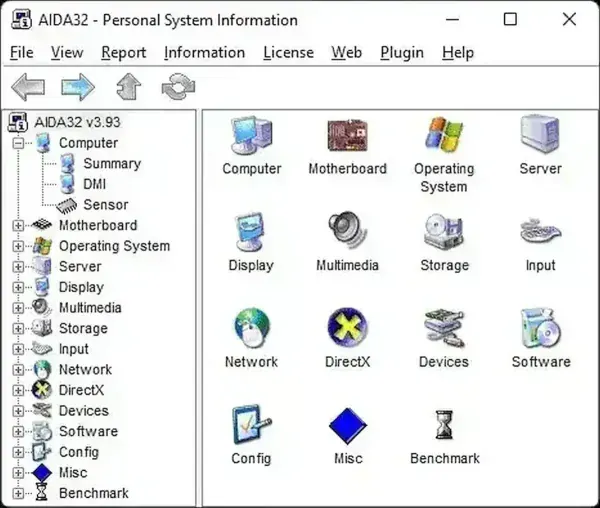
AIDA32 is a small, standalone tool that digs into your computer and quickly shows you everything you need to know about its hardware, software, and operating system. Even though it's no longer updated, plenty of people still rely on it for older Windows machines because it's fast, lightweight, and has a huge database of parts.
You don't need to install anything - the portable version just runs straight from a USB stick. That's a big win if you're a tech who jumps between computers all day. Whether you're trying to track what's inside a PC, figure out why something won't work, or just getting ready for an upgrade, it'll give you a full report in seconds.
- Developer: Tamas Miklos
- Initial Release: 2001
- Final Freeware Release: 2004
- License: Freeware
- Category: System Information & Hardware Diagnostics
- Official Website: Project Page
- Rating: ★★★★★
Why Use AIDA32?
AIDA32 provides a surprisingly complete hardware inventory while remaining lightweight and easy to use. It can identify nearly every major component inside your computer, making it useful for troubleshooting, system documentation, hardware upgrades, and inventory management.
Common tasks include:
- Identify Unknown Hardware: Quickly determine installed components and devices.
- Check Motherboard Details: View chipset, BIOS, and motherboard information.
- Inspect Memory: Display RAM capacity, modules, and timing information.
- View Processor Details: Identify CPU architecture, speed, and supported instruction sets.
- Analyze Storage Devices: Examine hard drives, SSDs, optical drives, and partitions.
- Review Network Configuration: Display network adapters, IP information, and hardware details.
- Generate Hardware Reports: Export detailed inventories for documentation or support.
Hardware Information Covered
AIDA32 gathers detailed information from virtually every major subsystem within your PC.
- Processor: CPU model, clock speed, cache, architecture, and supported technologies.
- Motherboard: Manufacturer, chipset, BIOS version, and expansion slots.
- Memory: Installed RAM modules, timings, and capacities.
- Graphics: Graphics adapter information, available video memory, and installed drivers.
- Storage: Hard drives, SSDs, optical drives, controllers, partitions, and file systems.
- Network: Ethernet adapters, wireless devices, MAC addresses, and configuration details.
- Operating System: Windows version, installed updates, services, startup applications, and system configuration.
- Peripheral Devices: USB devices, printers, audio hardware, PCI devices, and connected peripherals.
Notable Features
AIDA32 organizes complex hardware information into a clean tree-view interface that's easy to navigate. It also includes several useful reporting options for technicians and administrators.
- Detailed hardware and software inventory.
- Portable operation without installation.
- Export reports in HTML, CSV, or XML formats.
- Built-in hardware diagnostics and benchmarking information.
- Fast scanning with a lightweight footprint.
- Broad support for legacy Windows hardware.
Real World Use Cases
Although modern diagnostic utilities offer support for today's hardware, this tool remains useful in many situations.
- Technical Support: Generate complete hardware reports for troubleshooting.
- Hardware Upgrades: Verify motherboard, memory, and processor specifications before purchasing components.
- System Inventory: Document hardware configurations for offices, schools, or repair shops.
- Legacy Computer Maintenance: Diagnose older Windows systems with minimal resource usage.
- Refurbished PCs: Quickly identify installed hardware before resale or deployment.
Limitations
Because development ended years ago, it does have a few limitations.
- No longer actively maintained.
- May not correctly identify the newest CPUs, GPUs, and chipsets.
- Limited support for modern hardware sensors.
- Newer versions of Windows may expose hardware that AIDA32 cannot fully recognize.
For current hardware platforms, AIDA64 provides significantly better compatibility and expanded diagnostic capabilities.
Comparing Alternatives
Each portable diagnostic utility has its own strengths.
| Tool | Best For | Strengths | License |
|---|---|---|---|
| AIDA32 | Complete hardware inventory | Detailed reports, portable operation, export options | Freeware |
| CrystalDiskInfo | Drive health monitoring | SMART monitoring, temperatures, drive health alerts | Freeware |
| Speccy | General system overview | Simple interface, temperatures, quick hardware summary | Free & Paid |
Choose AIDA32 if you need:
- Detailed hardware inventories.
- Portable diagnostics without installation.
- System reports for documentation or technical support.
- A lightweight utility for older Windows computers.
From AIDA32 to AIDA64
Originally developed by Tamas Miklos, AIDA32 quickly became one of the most respected freeware hardware diagnostic utilities available for Windows. After development ended, the project evolved into AIDA64, which continues to receive regular updates and supports today's processors, graphics cards, storage devices, and enterprise environments.
While AIDA64 is the better choice for modern systems, the older version continues to be appreciated by technicians maintaining legacy computers because of its portability, speed, and simplicity.
AIDA32 Timeline
- 2001: Initial release of AIDA32.
- 2004: Final freeware version released.
- 2005+: Project evolves into the commercial AIDA64 product.
- Today: Continues to serve as a lightweight diagnostic utility for legacy Windows systems.
Frequently Asked Questions
Is AIDA32 still free?
Yes. The final AIDA32 release remains freeware and is still widely available.
What replaced AIDA32?
AIDA64 is the commercial successor that adds support for modern processors, chipsets, graphics cards, storage devices, and enterprise features.
Does AIDA32 work on Windows 11?
In many cases it will run on modern Windows versions, but newer hardware may not be fully recognized because development ended in 2004.
Can AIDA32 monitor temperatures?
Yes, when supported by your hardware and motherboard sensors, although modern monitoring utilities generally provide more complete sensor support.
Where to Download
- Modern Version: Download AIDA64
- Legacy Freeware: Download AIDA32 Portable
Final Thoughts
Although AIDA32 is no longer actively developed, it remains one of the best portable system information tools ever created for legacy Windows computers. Its comprehensive hardware reports, export capabilities, and portable design continue to make it useful for technicians, hobbyists, and anyone maintaining older PCs.
If you're working with modern hardware, AIDA64 is the natural successor. However, for lightweight diagnostics, hardware inventories, and quick system identification on older machines, it still earns a place in every portable toolkit.
