
Wink Portable is a free and lightweight screen recording and screencasting tool designed to run directly from a USB flash drive without installation. Based on the original Wink tutorial creation software, this portable version allows users to create software tutorials, demonstrations, and instructional walkthroughs from virtually any Windows PC.
Whether you are an educator, technician, developer, or support professional, Wink Portable provides a simple way to record screen activity, add annotations, and build interactive tutorials without installing software on the host machine.
Wink Portable Screen Recording and Tutorial Creator
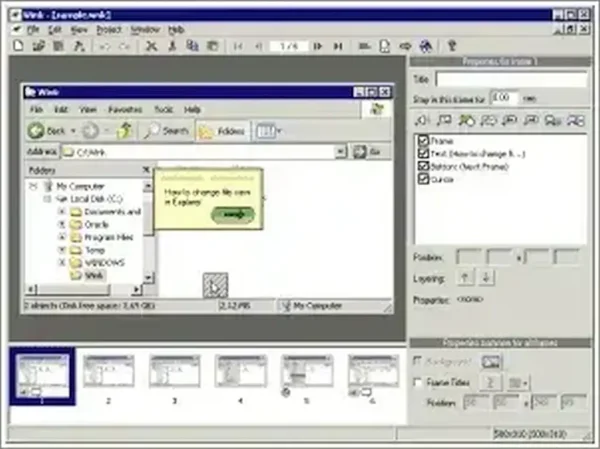
Wink Portable is designed specifically for creating instructional content such as software demonstrations, training material, help guides, and step by step walkthroughs. Unlike large modern video editors, Wink focuses on simplicity, low resource usage, and ease of use.
Because it is fully portable, the application can run directly from a USB flash drive, making it especially useful for technicians, trainers, and educators who work across multiple systems.
What is Wink Portable?
Wink Portable is a screen capture and tutorial authoring application that records on screen activity and allows users to create interactive training content. Users can capture mouse movement, keyboard input, and desktop interaction while adding narration, text, arrows, highlights, and navigation controls.
The software is particularly useful for:
- Creating software tutorials
- Recording application walkthroughs
- Building interactive training material
- Producing help documentation
- Creating e learning demonstrations
- Generating step by step instructional guides
Its lightweight footprint and portable design make it ideal for users who need quick screen recording functionality without installing larger software suites.
Key Features
- Portable and Lightweight: Runs directly from a USB flash drive without installation.
- Screen Recording: Capture screen activity and desktop interaction.
- Voice Narration Support: Add optional audio narration to tutorials.
- Interactive Tutorials: Insert buttons, navigation controls, text boxes, and instructional elements.
- Annotation Tools: Add arrows, highlights, callouts, and explanatory notes.
- Multiple Export Formats: Export tutorials as Flash, HTML, PDF, or standalone EXE files.
- User Friendly Interface: Simple enough for beginners while still offering advanced customization options.
- Low System Requirements: Minimal resource usage compared to larger screencasting suites.
How Wink Portable Works
The software records screen activity frame by frame while tracking user interactions. Once recording is complete, users can edit the project by adding instructional elements, annotations, transitions, and navigation controls.
Typical workflow:
- Launch Wink Portable from your USB drive or local folder.
- Start screen recording and capture desktop activity.
- Add narration, highlights, arrows, or text explanations.
- Edit slides and adjust tutorial flow.
- Export the completed project in your preferred format.
This approach makes Wink particularly useful for creating guided training content and software demonstrations.
Common Use Cases
- Teachers building e learning content
- IT professionals creating support tutorials
- Developers demonstrating application workflows
- Businesses producing customer help documentation
- Software trainers creating instructional guides
- Portable USB troubleshooting and training kits
Advantages of Portable Use
Because Wink Portable does not require installation:
- It can run from a USB flash drive
- No administrator rights are typically required
- No permanent changes are made to the host computer
- Easy to carry between multiple systems
- Useful for field technicians and trainers
This portability makes it especially convenient for users who regularly work on different PCs.
Limitations
While Wink Portable remains useful for lightweight tutorial creation, users should be aware of a few limitations:
- The interface may feel dated compared to modern screen recording software.
- Flash export functionality is now largely obsolete on modern systems.
- Advanced video editing capabilities are limited compared to professional screencasting tools.
- Primarily intended for tutorial creation rather than high definition video production.
Despite these limitations, it remains a practical lightweight solution for simple instructional content.
Frequently Asked Questions
Is Wink Portable free?
Yes. Wink Portable is completely free to use.
Does Wink Portable require installation?
No. It runs directly from a USB flash drive or folder without installation.
Can Wink Portable record screen activity?
Yes. It captures desktop interaction and screen activity for creating tutorials and walkthroughs.
Can I add narration and annotations?
Yes. Wink supports voice narration, text callouts, arrows, highlights, and other instructional annotations.
What export formats are supported?
Projects can be exported as Flash, HTML, PDF, and standalone EXE files.
What operating systems are supported?
Wink Portable is designed for Windows systems.
Specifications | Official Site | Download
- License: Freeware
- Developer: John T. Haller / PortableApps
- Platform: Windows
- Category: Screen Recording, Tutorial Creation
- Portable: Yes
- Rating: 4 Star
- Official Website: PortableApps Project Page
- Downloading: Download Wink Portable
Final Thoughts
Wink Portable remains a lightweight and practical solution for creating software tutorials, walkthroughs, and instructional content directly from a USB flash drive. Its combination of portability, screen recording functionality, annotation tools, and simplicity make it especially useful for educators, trainers, developers, and IT professionals.
Although newer screencasting applications offer more advanced video editing features, Wink Portable still stands out as an easy to use portable tutorial creation utility for Windows users who want a lightweight and efficient solution without installation requirements.