
Quick'n Easy FTP Server Lite is a free, lightweight FTP server for Windows that can be run as a portable application. Designed with beginners in mind, it provides a straightforward way to turn a Windows PC into an FTP server for transferring files over a network.
With its very small footprint and simple graphical interface, Quick'n Easy FTP Server Lite was particularly well suited to portable software collections and USB flash drives. The program includes setup and user-account wizards that make it possible to configure an FTP server without dealing with a large number of complicated settings.
Quick'n Easy FTP Server Lite | Portable FTP Server
What Is Quick'n Easy FTP Server Lite?
Quick'n Easy FTP Server Lite is a small Windows FTP server created by Pablo Software Solutions. FTP, or File Transfer Protocol, allows files to be transferred between computers across a network.
The Lite edition was created specifically for users who did not need the larger feature set of the professional version. Its emphasis is on simple configuration, an approachable interface, and the basic functionality required to operate an FTP server.
The official project page describes the software as an FTP server intended for beginners and includes both an FTP Server Setup Wizard and a User Account Wizard. Configuration can also be saved in XML format, while server activity can be viewed through a realtime trace and optionally written to a log file. :contentReference[oaicite:2]{index=2}
Why Use a Portable FTP Server?
A portable FTP server can be useful when you need to temporarily provide file access from a Windows computer without installing a large server package.
Because Quick'n Easy FTP Server Lite is distributed as a zipped executable package, it can be extracted to a folder and launched directly. This makes it a natural fit for a USB flash drive or portable technician toolkit.
For example, a portable FTP server can be useful for:
- Transferring files between computers on a local network.
- Temporarily sharing a folder with another computer.
- Testing FTP connections and FTP clients.
- Providing file access during troubleshooting.
- Carrying a small FTP server as part of a USB toolkit.
- Setting up a temporary file transfer server without a full server installation.
Key Features
- Small and Lightweight: The application has an exceptionally small footprint compared with modern server packages.
- Portable: The zipped executable can be extracted and run without requiring a traditional installation.
- FTP Server: Turns a Windows computer into an FTP server for network file transfers.
- Setup Wizard: A built-in wizard helps guide users through the initial server configuration.
- User Account Wizard: Quickly create FTP accounts and configure access for individual users.
- Simple Interface: Provides a graphical interface for managing users, configuration, and server operation.
- Network Support: Supports systems operating behind routers or firewalls.
- XML Configuration: Server configuration can be saved in XML format.
- Realtime Server Trace: Displays FTP commands and server responses while the server is operating.
- Logging: Server activity can also be recorded to a file.
- FTP Client Compatibility: Can be accessed using compatible FTP client software.
Quick'n Easy FTP Server Lite in Action
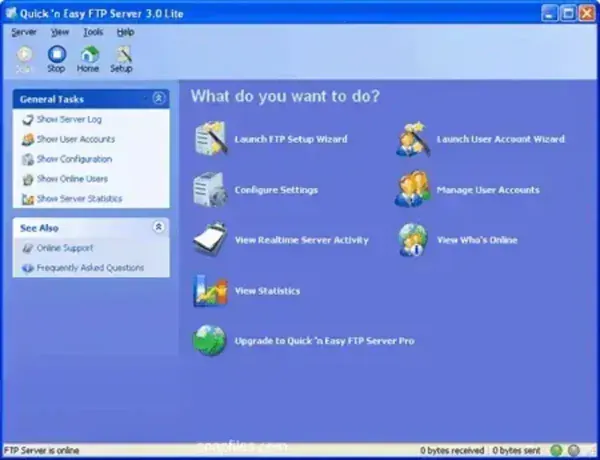
The software uses a relatively simple graphical interface for configuring the server and managing users. This makes it considerably less intimidating than many full-scale server packages.
The small footprint is one of its most interesting characteristics. Historical software listings report the Lite download at approximately 355 KB, making it exceptionally small even compared with other lightweight FTP servers. :contentReference[oaicite:3]{index=3}
Setting Up an FTP Server
Quick'n Easy FTP Server Lite was designed to make the initial setup relatively straightforward. The built-in setup wizard guides users through the basic configuration required to get the server running.
A typical setup involves:
- Download and extract the Quick'n Easy FTP Server Lite archive.
- Launch the FTP server executable.
- Run the built-in FTP Server Setup Wizard.
- Configure the server's listening port and other basic settings.
- Create an FTP user account using the User Account Wizard.
- Specify the folders and permissions that should be available to the user.
- Start the FTP server.
- Connect to the server using an FTP client from another computer on the network.
The official documentation specifically highlights the setup wizard and user-account wizard as features intended to simplify configuration. :contentReference[oaicite:4]{index=4}
Using Quick'n Easy FTP Server from a USB Drive
One of the reasons this application fits well on PendriveApps is its extremely small size and standalone distribution.
To carry it on a USB flash drive:
- Download the ZIP archive.
- Extract the contents to a folder on your USB flash drive.
- Launch the FTP server executable directly from the USB drive.
- Configure the server and user accounts.
- Start the FTP service when you need it.
- Stop the server before removing the USB drive.
This approach allows the FTP server and its configuration files to travel with you rather than being tied to a single Windows installation.
Local Network vs Internet FTP Access
An important distinction is whether the server is being used on a local network or exposed to the internet.
For simple file transfers between computers connected to the same local network, the setup is generally much easier. Internet-facing FTP servers require additional network configuration, including firewall and router settings, and should be carefully secured.
Quick'n Easy FTP Server Lite includes support for systems operating behind routers and firewalls, but configuring external access depends on the network environment. :contentReference[oaicite:5]{index=5}
For security reasons, avoid exposing an old FTP server directly to the public internet unless you understand the risks and have appropriate network protections in place.
FTP Client Compatibility
Once the server is running, you can connect to it using an FTP client. This makes it possible to transfer files between the server and another computer using familiar FTP tools.
For example, FileZilla Portable can be useful when you also want to carry the FTP client on a USB flash drive.
This combination creates a compact portable file-transfer toolkit consisting of both the server and client.
Quick'n Easy FTP Server Lite vs Professional
Pablo Software Solutions also produced a Professional edition with additional administration and management features. The Lite edition was intended for users who needed a simpler FTP server rather than the complete professional feature set. :contentReference[oaicite:6]{index=6}
The Professional edition added features such as IP address restrictions, virtual directories, per-user transfer limits, disk quotas, remote administration, transfer statistics, and additional server events.
For basic FTP file sharing, the Lite edition can therefore be a much simpler option.
Quick'n Easy FTP Server Lite Specifications
- Developer: Pablo Software Solutions
- Application: Quick'n Easy FTP Server Lite
- Latest Version Listed: 3.2
- License: Freeware
- Download Size: Approximately 355 KB
- Portability: Standalone / Portable
- Application Category: FTP Server / File Transfer Utility
- Editor Rating: 4 Star
- Platform: Windows
- Official Website: Project Page
- Download: Quick'n Easy FTP Server Lite Download
The developer's current project page continues to list Quick'n Easy FTP Server Lite 3.2 and provides a zipped executable download. :contentReference[oaicite:7]{index=7}
Frequently Asked Questions
What is Quick'n Easy FTP Server Lite?
Quick'n Easy FTP Server Lite is a small freeware FTP server for Windows that allows a computer to provide FTP-based file access over a network.
Is Quick'n Easy FTP Server Lite portable?
Yes. The software is distributed as a zipped executable package and can be extracted and launched directly, making it suitable for portable use.
How large is Quick'n Easy FTP Server Lite?
Historical listings report a download size of approximately 355 KB, making it an exceptionally small FTP server. :contentReference[oaicite:8]{index=8}
Does Quick'n Easy FTP Server Lite include a setup wizard?
Yes. The official project page lists a built-in FTP Server Setup Wizard and a User Account Wizard for simplifying initial configuration. :contentReference[oaicite:9]{index=9}
Can I run it from a USB flash drive?
Yes. Because the application is distributed as a standalone ZIP package, it can be extracted to removable storage and launched from there.
Can I connect to it with FileZilla?
Yes. Quick'n Easy FTP Server Lite is an FTP server, so it can be accessed using compatible FTP client software such as FileZilla.
Can I access the FTP server over the internet?
It can be configured for network environments involving routers and firewalls, but exposing an FTP server to the public internet requires additional network and security configuration. For most users, local network file sharing is the safer and simpler use case. :contentReference[oaicite:10]{index=10}
Is Quick'n Easy FTP Server Lite still available?
The developer's website still has a project page for Quick'n Easy FTP Server Lite and currently lists version 3.2 with a ZIP download. The software itself is an older application, so compatibility with modern Windows configurations should be tested before relying on it for important work. :contentReference[oaicite:11]{index=11}
Final Thoughts
Quick'n Easy FTP Server Lite is a great example of the tiny Windows utilities that made portable software particularly useful. Rather than requiring a large server stack, it provides a focused FTP server in an exceptionally small package.
Its setup wizard, user-account wizard, graphical interface, realtime server trace, XML configuration, and logging features provide considerably more functionality than its tiny footprint might suggest. :contentReference[oaicite:12]{index=12}
The application is particularly interesting for users who want to carry a simple FTP server on a USB flash drive. It can be extracted, configured, and launched when needed, making it useful for temporary file-transfer setups, local network testing, and portable technician toolkits.
It is worth remembering that this is an older Windows application. While the developer's site still provides the software, users should test it on their particular Windows version before depending on it for production or internet-facing use.
For a tiny, straightforward, and portable FTP server, however, Quick'n Easy FTP Server Lite remains an interesting piece of Windows freeware and a worthwhile addition to an archive of portable utilities.
