Quick Mailer (Qm): Tiny Portable SMTP Email Sender
Quick Mailer (Qm) is a tiny Windows utility designed to compose and send email without opening a full desktop email suite. The publisher describes support for attachments, multiple sender addresses, browser email links, and a Windows Explorer "Send To" workflow. Its small, no-install design suited older portable-software collections, but its age makes compatibility with modern mail services uncertain.
Send Email and Attach Files with Qm
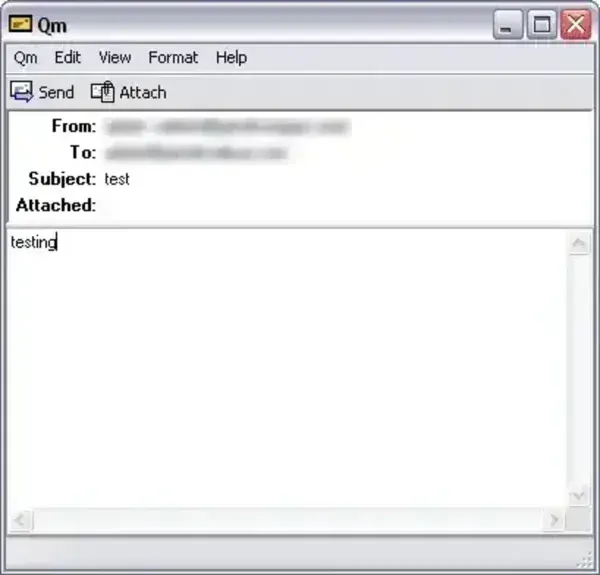
Qm sends outgoing messages through an SMTP server. Rather than synchronizing a mailbox, it focuses on composing a message, specifying recipients, and sending text or file attachments. The publisher also documents multiple sender addresses and integration with browser mailto: links and the Windows Explorer Send To menu.
This distinction matters: Quick Mailer is an email-sending utility, not a complete email client. It does not provide the familiar inbox, sent-mail synchronization, folders, search, calendar, or contact-management features found in full email applications. You should not expect it to download or manage incoming messages.
Basic Setup and Portable Operation
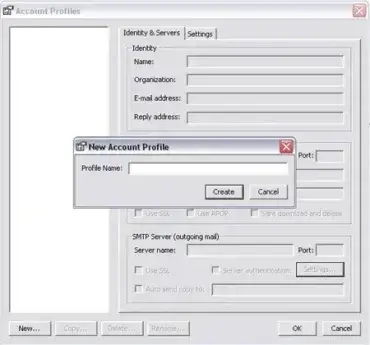
The publisher states that Qm can run without a conventional installation and can be launched from a directory of your choice. To use it, extract the program files, open the application, and configure the outgoing mail-server details required by your SMTP provider. You will generally need the server name, port, encryption mode, and any required authentication details. The exact fields and supported security options depend on Qm's legacy implementation and should be checked in the program's own documentation.
After configuring a compatible server, compose a short test message and send it to an address you control. Confirm that the message arrives and that any attachment opens correctly. If your provider rejects the connection or authentication, do not disable account protections or downgrade encryption just to make the old program connect.
Although the executable can be stored on a USB drive, portable operation does not guarantee that your email settings, credentials, or preferences will travel safely between computers. Check where Qm stores its configuration before carrying it on removable media, and avoid placing account passwords in an old application unless you have independently established how they are protected.
Important Email Compatibility and Security Limitations
Qm 2.2 is a legacy release and is no longer actively developed. Many modern email providers require encrypted SMTP connections, current authentication methods, or provider-specific app credentials. An older sender may not support the required TLS versions, authentication mechanisms, or modern sign-in flows. The availability of an SMTP server alone does not mean Qm can connect to it securely.
- Do not weaken account security: Never turn off multi-factor authentication or enable less-secure sign-in solely to accommodate an obsolete mail program.
- Protect credentials: Avoid saving passwords in an application unless its storage and encryption behavior are understood.
- Use a test account where possible: Test with a non-sensitive mailbox and a message that contains no private information.
- Do not treat it as a secure mail platform: A successful send does not establish that the connection or stored credentials meet current security expectations.
Quick Mailer Specifications and Download
- Developer: Pyric Interactive
- Version: 2.2
- License: Freeware
- Platform: Windows
- File size: Approximately 20 KB
- Development status: Legacy software, no longer actively developed
- Publisher website: Qm - The Quick Mailer
- Editor's Rating: ★★★☆☆ (3/5)
Frequently Asked Questions
Can Quick Mailer receive or synchronize email?
No. Qm is described as an outgoing email sender. It is not a synchronized inbox or a full email-management application.
Can I use Quick Mailer with Gmail or another modern provider?
Do not assume so. Provider requirements change, and Qm 2.2 may lack the current encryption and authentication support required by a particular service. Check the provider's current SMTP requirements and Qm's documented capabilities. If they do not match, use a maintained email client or the provider's webmail instead.
Does portable mode mean my email account settings are portable?
Not necessarily. The program may store configuration separately from its executable, and settings can include sensitive server or account information. Verify the storage location and protect any credentials before copying the folder to another computer.
Is Quick Mailer suitable for testing an SMTP server?
It may be useful for a basic send test when you have a compatible server and a non-sensitive test account. It is not a substitute for a current diagnostic tool, and a successful message send does not prove that all security settings are correct.
Is Quick Mailer Still Worth Using?
Quick Mailer's appeal is its very small footprint and focused approach to sending a message or attachment. Those qualities made sense for older Windows systems and simple SMTP setups. Today, the lack of ongoing development and uncertain support for modern encryption and authentication are significant limitations. Consider it a historical portable utility for compatible environments, not a secure replacement for a maintained email client. For more current options, browse our portable email clients.