
KMPlayer is a Free Portable Media Player that can be run entirely from a USB device. It can be used to play many popular file formats, including DVD, VCD, AVI, ASF, MKV, MP4, MPEG, OGM, WMF, RealMedia, Quicktime and almost every audio file without installing additional codecs.
In some cases, KMPlayer can play incomplete, damaged or even locked AVI or media files that are still being downloaded.
KMPlayer Media Player
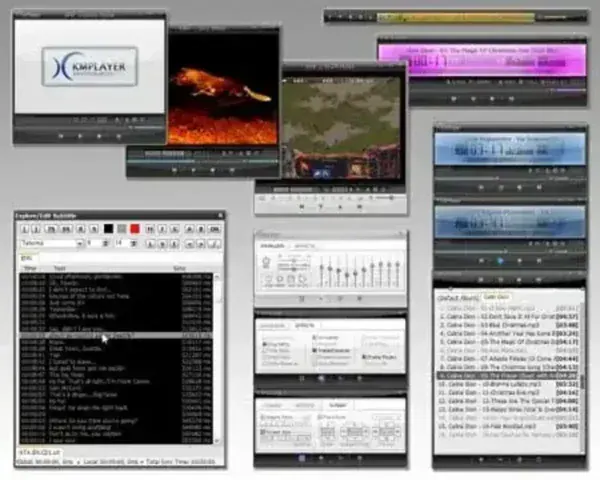
KMPlayer, also known as K-Multimedia Player, is a popular multimedia player software for Windows operating systems. It is known for its extensive format support, customization options, and intuitive user interface. It's an all in one solution for anyone who loves multimedia content. With its expansive support for video and audio formats, including niche and professional level formats, this free portable media player stands out as one of the most versatile players available. Whether you're a casual viewer, a film enthusiast, or a professional needing to play high-definition or 3D videos, it can handle it all.
Additionally, KMPlayer's cross platform support for devices like Android and iOS means that your favorite media can go wherever you do. Whether it's a movie night at home or streaming content on the go, KMPlayer ensures that you don't miss out on quality playback or essential features like subtitle synchronization or VR playback.
Here are some key features of this tool:
- Wide Format Support: Capable of playing a wide range of multimedia formats, including video, audio, and subtitle files. It can handle common formats like AVI, MP4, MKV, MP3, and more, as well as less common or niche formats.
- High Quality Playback: Offers high-quality video and audio playback. It supports 3D, 4K, and UHD video content and can provide a smooth and immersive viewing experience.
- Customization: Extensive customization options. Users can adjust various settings to tailor the player's appearance and functionality to their preferences. This includes skinning, themes, and configuration options.
- Subtitle Support: Has robust subtitle support, allowing users to load and customize subtitles for their media files. It offers subtitle synchronization and styling options.
- 3D and VR Playback: The software includes support for 3D and VR (Virtual Reality) content, making it suitable for users with 3D or VR-capable displays.
- Capture and Screen Recording: Allows users to capture screenshots or record video from within the player, making it a handy tool for creating screen captures or gameplay recordings.
- Online Content Streaming: It can also access online content, including streaming services and YouTube videos, making it a versatile multimedia player.
- CD/DVD Playback: Can be used to play CDs and DVDs, offering a full-featured media playback experience.
- Built in Codecs: It comes with a wide range of built-in audio and video codecs, reducing the need for external codec packs.
- Cross Platform: While the primary focus is on Windows, there are versions of KMPlayer available for other operating systems, including Android and iOS.
- Ad Supported Free Version: Is available for free, but it has ads in the interface. Users can choose to disable these ads by purchasing a premium version.
KMPlayer is a versatile multimedia player that appeals to a wide range of users, from casual media consumers to more advanced users looking for customization options and format support.
- Authors Website: Project Page
- License: Freeware
- Supported OS: Windows, Android
- Rating: 4 Star
How to make KMPlayer Portable
- Download KMPlayer
- Using 7-Zip, right-click the KMPlayer###.exe, and extract files to your USB device.
- Click KMPlayer.exe from the KMPlayer folder on your USB device to launch the program.
- Right-click and select Options > Preferences and under the General tab, check the option to Store settings to KMPCfg.ini then close the menu.
Final Thoughts
KMPlayer has proven itself to be an incredibly useful and reliable media player with impressive features that cater to both casual users and advanced media consumers. Its portability allows users to enjoy multimedia on any compatible device, without installation or complicated setup. While the ad-supported free version may deter some users, the premium option offers a seamless, ad-free experience that's worth considering for regular use.
If you're looking for a robust, lightweight, and customizable multimedia player, it is definitely worth a try. Its vast format support, high-quality playback, and handy features like streaming, screen recording, and VR compatibility make it a top choice for media lovers everywhere.
