
FotoSizer is a lightweight, free batch image resizer for Windows that can be made portable to run directly from a USB flash drive. It allows users to resize, compress, and convert images in bulk, supporting popular image formats such as JPG, PNG, GIF, TGA, and BMP. This makes FotoSizer an ideal portable tool for photographers, bloggers, webmasters, and anyone needing fast image optimization without installing heavy image editors.
Whether you are preparing photos for websites, reducing image file sizes for email, or converting large batches of pictures for archival purposes, this free software can handle dozens or even hundreds of images in just a few clicks.
Batch Resize Images for Free with FotoSizer
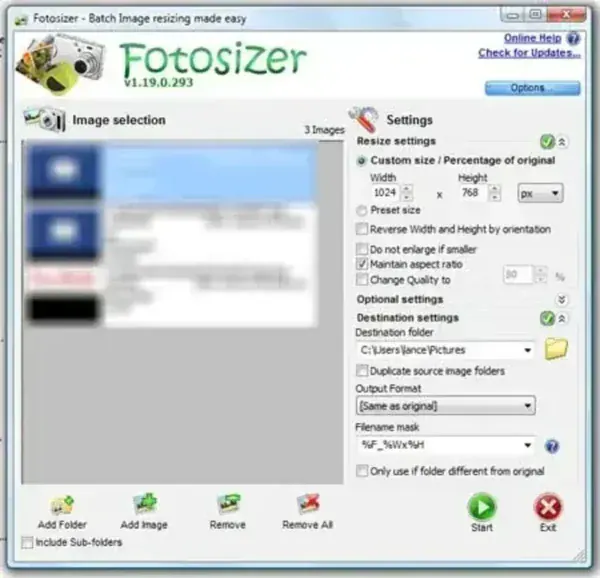
FotoSizer focuses on one thing and does it well: fast batch image processing. Instead of opening and editing images one at a time, you can apply the same resize, compression, or rotation settings to an entire folder of pictures. This saves time and reduces repetitive work, especially when dealing with large image collections.
Key Features
- Batch resize images by percentage or fixed width × height
- Supports JPG, PNG, GIF, BMP, and TGA image formats
- Adjust image quality and compression levels
- Flip, rotate, or apply simple effects such as black & white or negative
- Batch rename files during processing
- Clean, beginner friendly interface with minimal learning curve
- Multilingual interface including English, French, German, Spanish, Italian, Turkish, and Portuguese (Brazilian)
Technical Specifications
- Author's Website: Official Project Page
- Operating System: Windows 11, Windows 10, and earlier versions
- License: Freeware (optional paid Pro edition available)
- Application Type: Image Utility / Batch Image Resizer
- Editor's Rating: ★★★★☆ (4 out of 5)
How to Make FotoSizer Portable (Run from USB)
Although FotoSizer is distributed as a traditional Windows installer, it can be used portably with a little preparation. This allows you to run it directly from a USB flash drive without leaving traces on the host system.
- Download FotoSizer (fsSetup###.exe).
- Use 7-Zip or a similar archive tool to extract the installer contents.
- Copy the extracted FotoSizer folder directly to your USB flash drive.
- Launch FotoSizer.exe from the USB drive to run it portably.
Why Use FotoSizer for Batch Image Resizing?
FotoSizer provides a fast, no fuss solution for bulk image resizing and image compression. Unlike full image editing suites such as Photoshop or GIMP, it focuses entirely on batch operations and does not require installation when used portably.
This makes it especially useful for:
- Reducing image sizes for faster website loading
- Preparing photo collections for email, USB sharing, or cloud uploads
- Applying consistent resizing and compression across large image sets
If you need to inspect or manage image metadata after resizing, tools such as ExifDataView
can be useful for reviewing EXIF and camera information.
Limitations to Consider
- Not intended for advanced photo editing or retouching
- No layer based editing or RAW photo processing
- Best suited for batch workflows rather than single image fine tuning
Final Take on This Batch Image Resizing Tool
FotoSizer remains a simple yet powerful batch image resizing tool for Windows users who want fast results without complexity. Its ability to resize, compress, and convert images in bulk makes it an excellent portable utility for photographers, webmasters, and everyday users alike.
The option to run the utility stand alone portable from a USB flash drive adds even more flexibility, making it a practical tool for on the go use or IT environments. If your workflow involves processing large numbers of images quickly and efficiently, this is a dependable and time saving solution worth keeping on your portable software toolkit.
