
The Letter Encrypter is a lightweight and portable text encryption tool designed to help users protect private notes, letters, and messages with password-based encryption. If you've ever wondered how to encrypt notes or send a secret text message that only the intended recipient can read, this simple freeware utility offers an easy solution.
The Letter Encrypter | Encrypt Notes and Secret Messages
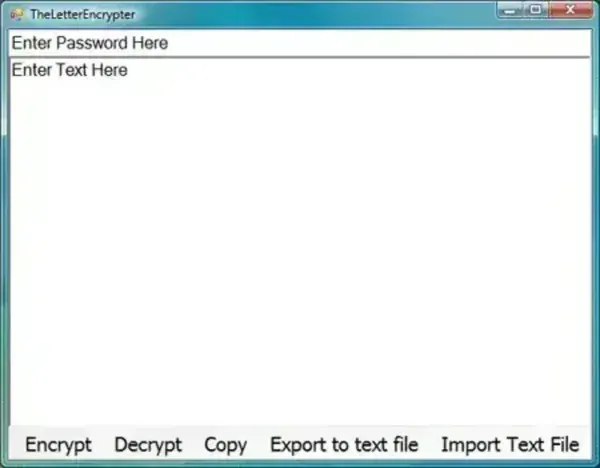
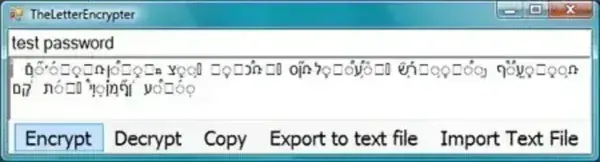
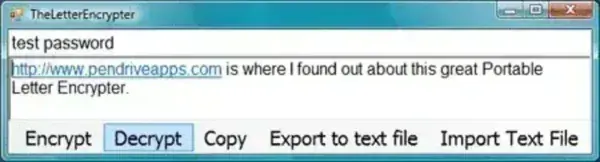
Whether you're storing personal notes, sharing private information, or protecting sensitive text from casual viewing, The Letter Encrypter allows you to transform plain text into encrypted text that can only be restored using the correct password.
Its tiny footprint and portable design make it an ideal addition to any USB toolkit.
How The Letter Encrypter Works
Using the program is straightforward:
- Type or paste your message into the text area.
- Enter a password.
- Click Encrypt to convert the message into encrypted text.
- Share or save the encrypted output.
- To read the message later, paste the encrypted text back into the program, enter the same password, and click Decrypt.
Without the correct password, the encrypted text appears unreadable.
Key Features
- Password-Protected Text Encryption: Encrypt notes, letters, and messages using a user-defined password.
- Portable Application: No installation required. Run directly from a USB flash drive or folder.
- Extremely Small Size: Requires only 28 KB of storage space.
- Simple Interface: Easy enough for beginners with virtually no learning curve.
- Offline Operation: Works entirely on your local computer without an internet connection.
- Freeware: Completely free to download and use.
Common Uses
- Protecting personal notes
- Creating password-protected text messages
- Storing private reminders
- Sending confidential information through text-based communication
- Keeping sensitive written information hidden from casual viewing
Pros and Cons
Pros
- Extremely lightweight
- Portable and requires no installation
- Easy to use
- Works offline
- Completely free
Cons
- Designed for text messages only
- Cannot encrypt files or folders
- Limited advanced encryption features compared to modern security tools
- Encryption algorithm details are not publicly documented
Frequently Asked Questions
Is The Letter Encrypter free?
Yes. The application is distributed as freeware and can be used without cost.
Does it require installation?
No. It is fully portable and can run directly from a USB drive or local folder.
Can it encrypt files?
No. The utility is designed specifically for encrypting text messages and notes.
Can I use it offline?
Yes. All encryption and decryption takes place locally on your computer.
What operating systems are supported?
The application is designed for Microsoft Windows systems.
How do I decrypt a message?
Paste the encrypted text into the program, enter the original password, and click the Decrypt button.
Specifications | Official Site | Download
- Extracted Size: 28 KB
- Author Website: Project Page
- License: Freeware
- Platform: Windows
- Category: Encryption Utilities
- Editor's Rating: ★★★★☆ (4 Star)
- Download: Download The Letter Encrypter
Final Thoughts
The Letter Encrypter provides a quick and simple way to password-protect notes and text messages without installing complex software. While it is not intended to replace modern file encryption solutions, its portability, tiny size, and ease of use make it a useful utility for basic text encryption tasks.
For users looking for a lightweight portable tool to encrypt notes and secret messages on Windows, The Letter Encrypter remains a practical option.