
Defraggler Portable is a free file and disk defragmenter tool that can be used to defragment only the files you want to or defrag an entire drive. It can be used for defragmenting both internal and external drives including USB flash drives. This free defragmenting software uses an attractive GUI that is intuitive and is really easy to use.
Defraggler Free Disk Defragmenter
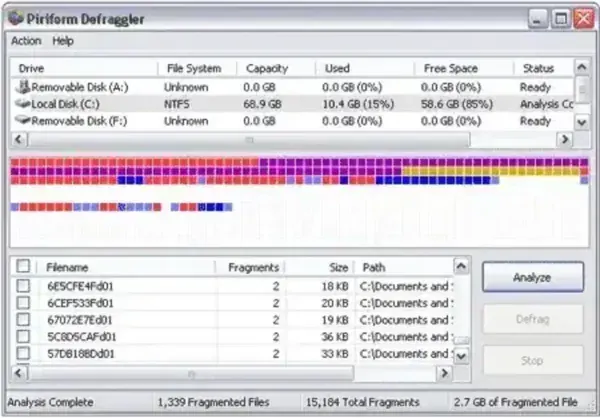
This free defrag software enables you to defragment a computer's entire hard drive or only select files.
- Extracted Size: 6.3MB
- Authors Website: Project Page
- Developer: Piriform (a subsidiary of Avast)
- License: Freeware
- Extracted Size: +- 40MB
- Rating: Full 5 Stars
- Supported OS: Windows 11, 10, 8, 7, XP
About Defraggler
Defraggler is a disk defragmentation utility developed by Piriform (now owned by Avast), the same company behind popular software like Speccy, CCleaner Portable, and Recuva. This free disk defrag software allows users to defragment individual files, groups of files, or an entire disk drive to improve system performance by reorganizing fragmented data so that files are stored in contiguous sections of the disk.
Defraggler is designed to help improve the performance of your computer by optimizing the way files are stored on your hard drive. Over time, files can become fragmented, meaning they are split into different pieces scattered across the disk. This can slow down your computer because it takes longer for the drive to read these fragmented files. It helps by reassembling these pieces and storing them contiguously.
Here are some of its features:
- Selective Defragmenting: Allows you to choose specific files, folders, or drives to defragment. This feature is useful if you only want to target certain areas of your disk.
- Quick Defrag: Offers a quick defragmenting option that focuses on optimizing fragmented files without performing a full defragmentation. This can be especially useful if you're looking for a faster optimization process.
- Full Drive Defragmentation: Can also perform a comprehensive defragmentation of the entire hard drive, optimizing the placement of all files and folders.
- Schedule Defragmenting Time: You can set up scheduled defragmentation tasks to automatically optimize your hard drive at specified times. This helps ensure that your disk remains optimized without manual intervention.
- Interactive Drive Map: An interactive drive map that displays the fragmented and defragmented areas of your disk. This visualization helps you understand the layout of your files and the effectiveness of the defragmentation process.
- File Placement Optimization: The software allows you to manually move certain files to specific locations on the disk, potentially improving access times for frequently used files.
- SSD Optimization (TRIM): While traditional disk defragmentation isn't recommended for solid-state drives (SSDs), this software includes an option to optimize SSDs using the TRIM command. This helps maintain the performance and lifespan of your SSD.
- Detailed Reports: Provides detailed reports after each defragmentation session, showing the results and improvements made to your disk's fragmentation status.
- Free and Paid Versions: The version with basic features is offered for free while a paid version is available that includes additional features and customer support.
- User Friendly GUI: Includes an intuitive and user friendly general user interface that makes it easy to use, even for individuals who are not technically inclined.
Alternative to Defraggler: WinContig
WinContig is a lightweight and portable alternative to Defraggler, designed for users seeking a simple yet effective disk defragmentation solution. Unlike Defraggler, which offers a graphical interface with features like drive maps and scheduling, it focuses on a minimalist approach, allowing users to defragment specific files or folders without processing the entire drive. It's particularly suited for advanced users, thanks to its command-line support, which enables automation and integration into scripts. Completely free and without the need for installation, WinContig is an excellent choice for those who value portability, efficiency, and simplicity over a feature-rich interface.
Here's a chart breaking down the two for comparison:
| Feature | Defraggler | WinContig |
|---|---|---|
| Developer | Piriform (owned by Avast) | M. Fioretti |
| File/Folder Defragmentation | Yes | Yes |
| Entire Drive Defragmentation | Yes | Yes |
| Portable Version | Yes | Yes |
| Automatic Scheduling | Yes | No |
| User Interface | Graphical Interface with Drive Map | Minimalist Interface |
| Command-Line Support | No | Yes |
| Cost | Free (Premium version available) | Free |
How to make Defraggler Portable
It can also be made to run directly from removable media such as a USB flash drive making it a stand alone program.
You can follow these steps to make it portable:
- Download the dfsetup222.exe installer program.
- Extract the files from the .exe to a folder on your USB flash drive using 7-zip.
- Create a file named portable.dat file containing the following text, in the folder on your removable drive;
#PORTABLE#
- Use Defraggler.exe or the 64bit variant from the folder on your USB to run the program.
Alternately, you can download this ready to use defraggler portable zip.
Review Conclusion
Defraggler offers a nice free solid defragmentation option for users looking to optimize their hard drives. It stands out with its feature rich interface, offering graphical visuals, automatic scheduling, and full drive optimization. It's perfect for users who prefer an easy-to-use tool with advanced options, such as SSD optimization and detailed reports. Whether you're looking to defragment individual files or entire drives, it provides a comprehensive solution to improve system performance.
On the other hand, if you value simplicity and portability, WinContig serves as an excellent alternative. Its minimalist design and command-line support make it a great choice for advanced users who need a lightweight, no-installation-required defragmenter. Both tools are free, and your choice will ultimately depend on whether you prefer an intuitive GUI with extra features or a streamlined, portable option for quick and efficient defragmentation. Either way, these tools will help keep your hard drive in top shape, ensuring smooth and fast performance.
In my personal opinion, Defraggler is the best free defragmenting software available that can be taken with you to use on the go.
