
NetSetMan is a compact and powerful FREE portable network manager tool designed for users who frequently switch between different network environments. Whether you're a student commuting between campus and home, a business professional working in multiple office locations, or simply someone with varied network setups, NetSetMan makes network management effortless.
NetSetMan: Portable Network Manager
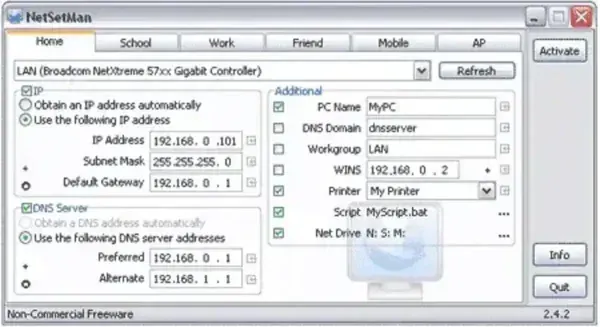
Instead of manually changing IP settings, DNS servers, default printers, or mapped drives every time you move, this networking manager allows you to create up to 6 unique network profiles. You can switch between them instantly with a single click, no system reboot or admin rights required after the initial setup. It's ideal for laptops, portable workstations, or USB drive use.
Key Features:
- Manage IP address, Subnet Mask, Gateway, DNS servers
- Set default printer, workgroup/domain, computer name
- Map network drives and assign scripts to run automatically
- WiFi management and proxy settings support
- One-click activation of profiles
Specifications and Downloading
- Author's Website: Project Page
- Extracted Size: 5.8 MB
- License: Freeware (For Personal Use Only)
- Supported OS: Windows
- Rating: 4 Star
How to Make NetSetMan Portable
- Download NetSetMan and run the installer.
- Select the Extract Files option for portable use.
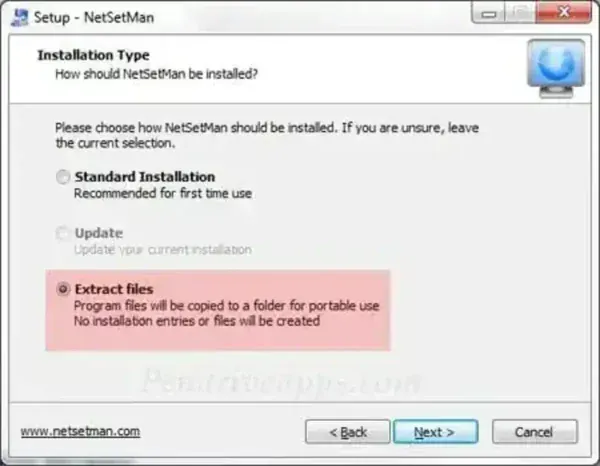
- Navigate to the extracted folder and click netsetman.exe to launch the program.
Final Thoughts
With its intuitive interface and lightweight design, this is a must have utility for anyone needing seamless transitions between networks without the hassle of repeated configuration. Portable, efficient, and very user friendly, it's stand alone portable network management made super simple.
