
SpeedFan is a fan speed controller and system temperature monitor for PC. Use it to change fan speed without entering BIOS, to keep a computer from overheating. This nifty system tool can read and monitor motherboard temperatures and voltages, and then be used to adjust or control fan speeds of a computer.
About SpeedFan
Easily monitor temps & control fan speed with SpeedFan.
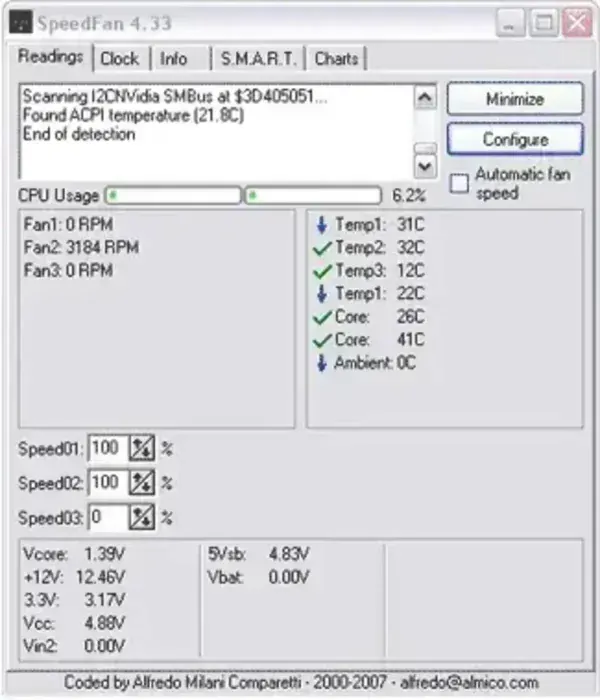
SpeedFan is a software tool designed for monitoring and controlling the speed of the fans in a computer. It is widely used for managing the cooling of a computer system and ensuring optimal performance while minimizing noise.
The portable software works by checking the status of your hard disk using S.M.A.R.T. or SCSI attributes on computers with hardware monitor digital temperature sensor chips. You can also create custom events to automatically handle just about every situation.
Here are some of its features:
- Temperature Monitoring: Reads temperature sensors on various components of your computer, such as the CPU, GPU, and hard drives. It provides real-time temperature data, allowing you to monitor the thermal status of your system.
- Fan Speed Control: One of the primary functions of SpeedFan is to control the speed of the fans in your computer. By adjusting fan speeds based on temperature readings, it helps maintain optimal cooling while reducing noise levels.
- Voltage Monitoring: Can monitor the voltages supplied to various components, helping you ensure that your hardware is receiving the correct power levels.
- S.M.A.R.T. Analysis: Includes support for S.M.A.R.T. (Self-Monitoring, Analysis, and Reporting Technology), which allows it to read and analyze data from your hard drives. This feature helps you predict potential hard drive failures and take preventive measures.
- Graphing and Logging: SpeedFan can create graphs and logs of temperature, fan speed, and voltage data over time. This feature is useful for identifying trends and diagnosing issues.
- Customization and Profiles: Users can create custom fan profiles and set specific temperature thresholds at which the fans should increase or decrease their speed. This allows for a tailored cooling solution based on individual needs and preferences.
- Remote Monitoring: Can be configured to send temperature, fan speed, and voltage data to remote systems, enabling remote monitoring and management of a computer's thermal performance.
How to Use SpeedFan
- Download and Install: SpeedFan can be downloaded from the official website below. After downloading, run the installer and follow the on-screen instructions to complete the installation.
- Configuration: Open the program and let it detect your hardware sensors. This may take a few moments. Once detected, you can configure the software to suit your needs.
- Setting Up Fan Control:
- Navigate to the "Configure" menu.
- Go to the "Fans" tab and select the fans you want to control.
- Set up temperature sensors under the "Temperatures" tab and link them to the respective fans.
- Create custom profiles under the "Speeds" tab to define how the fan speeds should react to temperature changes.
- Monitoring and Adjusting: Use the main interface to monitor real-time temperature, fan speed, and voltage data. Adjust fan speeds manually if needed or let SpeedFan manage them automatically based on your profiles.
Other Considerations:
Compatibility: You'll need to ensure your motherboard and fans are compatible. Not all hardware supports software-based fan control.
Overheating: Be cautious when setting custom fan profiles. Incorrect settings could lead to overheating if fans do not ramp up when needed.
Data Accuracy: Double-check temperature readings against BIOS or other reliable hardware monitoring tools to ensure data accuracy.
SpeedFan is a powerful tool for users who want precise control over their computer's cooling system. Proper configuration can lead to quieter operation and longer hardware lifespan.
Specifications | Authors Site | Download
- Authors Website: almico.com
- License: Freeware
- Extracted Size: Requires roughly 3.76 MB of free storage space.
- Operating Systems: Microsoft Windows 11, Windows 10, Windows 8, Windows 7
- Price: Free
- Application Category: Utility
- Editor's Rating: ★★★★★
- Downloading: You can get this advanced temp monitoring fan speed controller software here:
SpeedFan Download
Final Thoughts
SpeedFan is a powerful and versatile tool for monitoring system temperatures and controlling fan speeds, making it an excellent choice for users who want to optimize their PC's cooling performance. With features like real-time temperature tracking, voltage monitoring, S.M.A.R.T. analysis, and customizable fan profiles, it offers a high level of control over your system's thermal management.
However, compatibility with hardware varies, and users should take care when configuring fan speed settings to avoid potential overheating. While it may have a learning curve, those willing to explore its features will find it an invaluable utility for balancing cooling efficiency and noise reduction. If you're looking for a free, lightweight, and feature rich fan control solution, I think SpeedFan remains one of the best options available.
