
IMGBurn Portable is a lightweight and powerful tool that can help you easily create ISO images from USB drives (USB to ISO). It is a great tool for users who are looking to make ISO images of their USB drives quickly and without any hassle.
Portable ImgBurn
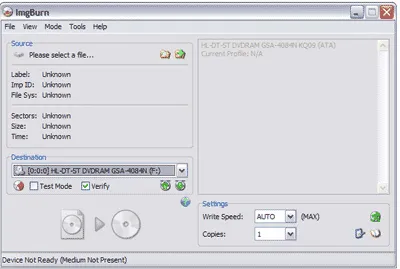
- Authors Website: Project Page
- Developer: Lightning UK!
- Release Date: First release of ImgBurn was February 7, 2005
- License: Freeware
- Supported OS: Windows
What is ImgBurn?
Created by Lightning UK software, this is a tiny, yet powerful CD, DVD, HD DVD, and Blu-ray recording tool. The free image burning software can read a disk to an img file, write files from your computer directly to a disc, and even create img files from data on your computer. It can also be used to copy a bootable USB to an ISO file.
IMGBurn Portable comes with an intuitive user interface that makes it easy to use even for beginners. It has a wide range of features, such as the ability to create bootable USB drives, extract files from ISO images, and more. Additionally, the software can also be used to burn ISO images back onto blank DVDs or CDs in just a few clicks.
Overall, this tool is an excellent choice for anyone who needs an easy-to-use and reliable tool for creating or burning ISO images on their USB drive or blank optical media. This Free CD DVD Burner can even be made to run from a USB flash drive – see below. Anyone who does a lot of disc burning will likely want to add this tool to their portable collection.
Features include:
- Create Disc Images: Allows you to create disc image files from files and folders on your computer or even make backup copies of bootable USB drives "make ISO from bootable USB".
- Burn Disc Images: Use it to burn disc image files (such as ISO, BIN, and IMG files) to physical discs. This includes CDs, DVDs, and Blu-ray discs.
- Build Mode: Includes a "Build" mode that lets you create a disc image from scratch. You can add files and folders to the project and then burn them to a disc or save them as an image file.
- Verify Disc Backup: After burning a disc, you can verify the data written to the disc to ensure that it matches the original backed up source files. This helps ensure data integrity.
- Support for Multiple Formats: Supports various disc formats, including CD-R, CD-RW, DVD-R, DVD+R, DVD-RW, DVD+RW, DVD-R DL, DVD+R DL, BD-R, and BD-RE.
- Multi language Support: The program is available in multiple languages, making it accessible to a broader user base.
- Layer Break Selection: When working with dual-layer DVDs or Blu-ray discs, you can manually set the layer break position for better control over disc layout.
- Integration with DVD Video Content: Can be used to create DVD Video discs, complete with menus and chapters, making it useful for authoring DVDs.
- Lightweight: The program is lightweight and doesn't require a lot of system resources, making it suitable for older computers.
- Free and Open Source: Is freeware and also an open source project, so it's actively maintained and supported by a community of developers.
How to make ImgBurn Portable
Making ImgBurn Portable is as simple as extracting the contents of the setup file to your removable drive and then creating a custom ini file to control the file paths or locations.
- Download Imgburn executable and extract its contents using 7-Zip to your removable device.
- Then, download and copy this ImgBurn.ini to the $PLUGINSDIR folder.
- Finally, click ImgBurn.exe to launch the program.
How to Copy USB to ISO
Here are the steps to copy USB to ISO:
Note that this should also work to create or make ISO from bootable USB drives.
- First, launch the executable.
- Next, select the option to Create image file from disc.
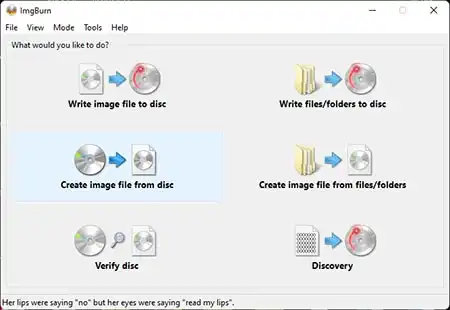
- Then, choose your USB flash drive to set it as the Source.
- Select a destination for the resulting ISO file.
- Click the arrow -> to build.
If all went well, you should now have a backup of your USB flash drive as a bootable ISO file (USB to ISO).

