
XnView is an free image viewer, graphical image file converter, and batch image resizer. It can import close to 400 different picture formats and can export around 40 different formats. All while utilizing a familiar explorer like user interface. This image editing utility is often compared by others to other popular free tools such as IrfanView.
XnView | Batch Image Resizer
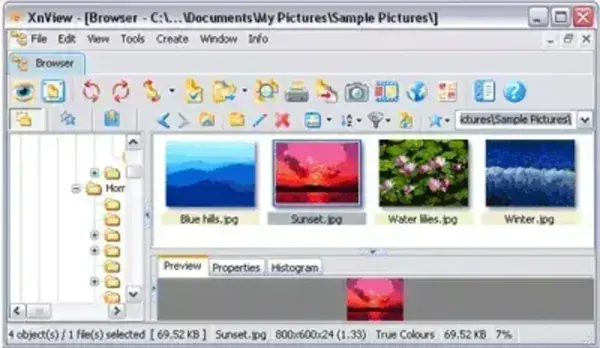
- Authors Website: Project Page
- Developer: authored by Pierre Emmanuel Gougelet.
- Release Date: First released in 1998
- License: Freeware (for non commercial use)
- Cross Platform: Windows, macOS, and Linux
Some features include the ability to apply filters and effects to images, crop and resize images, screen capture (screen shot), edit the metadata of images, as well as modify the number of colors used. The tool also supports batch processing, allowing you to batch resize a group of images all at once. Best of all, it can be made to run from a USB flash drive or other external storage device, so you can bring it with you. Further eliminating the need to have it installed on a computer.
The following image formats are supported; JPEG, JPEG2000, TIFF, GIF, PNG, WEBP, PSD, RAW, HEIC, PDF, CR2, DNG, and OpenEXR.
What is XNView?
XnView is a versatile and popular cross-platform image viewer, browser, and converter. It supports a wide range of image formats and provides various tools for viewing, organizing, and editing images including batch image processing. Here is a breakdown:
- Image Viewer and Browser: Allows users to view and browse through images in various formats. It provides a user-friendly interface for quickly navigating through a collection of images.
- Image Format Support: It supports a broad range of image formats, including popular ones like JPEG, PNG, GIF, BMP, TIFF, and many others.
- Batch Image Processing: It is known for its powerful batch processing capabilities. Users can perform operations, such as resizing, converting, and renaming, on multiple images simultaneously.
- Image Editing: While not as advanced as dedicated image editing software, XnView does offer basic image editing features. Users can adjust brightness, contrast, and color balance, as well as apply filters and effects.
- Get Image Metadata and Exif Information: It can display and edit metadata and Exif information associated with images, providing details about the camera settings, date taken, and more.
- Thumbnail Creation: The software can generate thumbnails for quick previews of images in a folder.
- Slideshow Creation: Users can create slideshows with customizable settings, including transition effects and timings.
- Multilingual Interface: Available in multiple languages, making it accessible to users around the world.
Installing this Image Converter to a USB flash drive
- Download XnView zipped file and extract (unzip) it to your USB flash drive.
- Then, download this xnview.ini file and copy it to your XnView folder.
- Finally, click .exe from the folder to run the program.
If all went well, this free and portable image editing and batch conversion software should now be up and running from your flash drive.