
Restoration is a free and portable file recovery utility that helps users recover deleted files from hard drives, USB flash drives, memory cards, and other storage devices. This lightweight undelete tool can restore files removed from Windows, emptied from the Recycle Bin, or accidentally deleted from supported FAT and NTFS file systems.
Restoration | Free Portable File Recovery Software
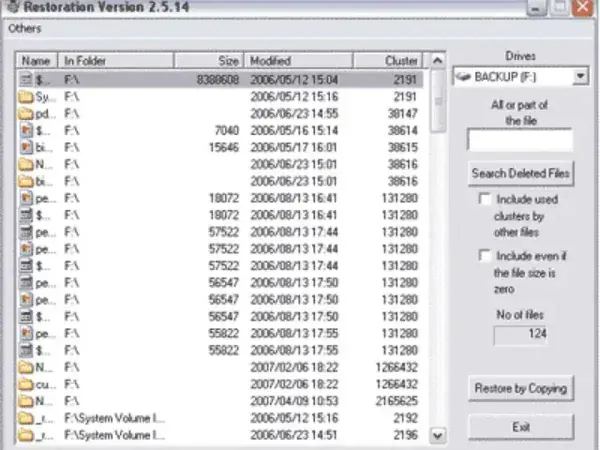
Restoration is a tiny standalone data recovery tool designed to help recover deleted files without requiring installation. Despite its small size, the software can scan storage devices for recoverable data and restore files that have not yet been overwritten.
Because it is completely portable, Restoration can be carried on a USB flash drive and launched whenever accidental file deletion occurs.
What is Restoration?
Restoration is a freeware file recovery program created by Mike Baynes that focuses on recovering deleted files from Windows storage devices. When files are deleted, Windows typically removes references to the file while leaving the underlying data intact until it is overwritten.
Restoration scans the drive for these deleted file entries and attempts to recover them before new data replaces the original content.
The utility supports recovery from:
- Hard disk drives (HDDs)
- USB flash drives
- CompactFlash cards
- Memory cards
- External storage devices
- FAT and NTFS file systems
Key Features
- Recover Deleted Files: Restore files deleted from Windows or emptied from the Recycle Bin.
- Portable Utility: No installation required.
- USB Recovery: Recover files from USB flash drives and removable media.
- Image Recovery: Restore deleted photos and digital camera images.
- Search Filters: Locate recoverable files by name or extension.
- Secure Deletion: Permanently erase files to prevent future recovery.
- Lightweight: Less than 500 KB in size.
How Restoration Works
When a file is deleted, the operating system usually marks the space as available rather than immediately erasing the data.
Restoration scans the file system for deleted entries and displays files that may still be recoverable. Users can then select the files they want to restore and choose a recovery location.
For the best chance of successful recovery:
- Stop using the affected drive immediately
- Avoid saving new files to the drive
- Run the recovery tool from a different drive when possible
- Save recovered files to another storage device
Common Use Cases
- Recovering accidentally deleted documents
- Restoring deleted photos from memory cards
- Recovering files removed from the Recycle Bin
- Recovering data from USB flash drives
- Finding lost image files from digital cameras
- Securely deleting sensitive files
Limitations
Restoration works best when deleted files have not been overwritten. Recovery success decreases as additional data is written to the storage device.
The software does not support:
- Encrypted files
- Damaged file systems
- Physically failed drives
- Modern advanced recovery techniques found in commercial products
Because development appears to have ended years ago, compatibility with newer storage technologies may vary.
Specifications | Official Site | Download
- Author's Website: Archived Project Page
This project appears to be abandoned. An archived copy of the original website is provided. - Developer: Mike Baynes (MikeBike)
- License: Freeware
- Extracted Size: Under 500 KB
- Supported Operating Systems: Windows 95, 98, Me, NT, 2000, XP
- Supported File Systems: FAT12, FAT16, FAT32, NTFS
- Rating: 4 Star
- Limitations: Encrypted files are not supported
- Download: Download Restoration
Pros and Cons
Pros
- Free and lightweight
- No installation required
- Simple interface
- Supports USB drive recovery
- Includes secure deletion features
Cons
- No longer actively developed
- Limited support for modern storage technologies
- Basic recovery capabilities compared to newer tools
- Official website is no longer available
Final Thoughts
Restoration remains a useful portable file recovery tool for recovering deleted documents, photos, and other files from Windows storage devices. While newer recovery applications offer more advanced features, Restoration's simplicity, tiny size, and portability continue to make it a handy addition to any USB toolkit.
For users looking for a lightweight undelete utility that can recover files from hard drives, USB flash drives, and memory cards, Restoration is still worth keeping on hand.