
EasyCleaner is a free and portable system cleanup utility for Windows that helps users remove temporary files, invalid registry entries, broken shortcuts, duplicate files, and other unnecessary data that can accumulate over time. Developed by ToniArts, EasyCleaner combines several maintenance tools into a lightweight package that can be run directly from a USB flash drive without installation.
EasyCleaner | Portable Registry Cleaner and System Cleanup Tool
What is EasyCleaner?
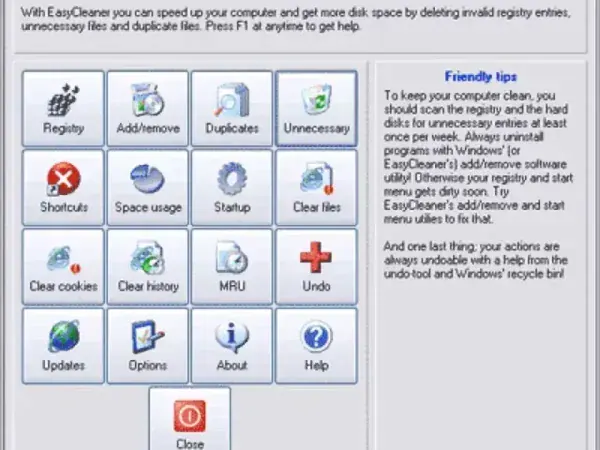
EasyCleaner is a freeware Windows maintenance utility designed to help users locate and remove unnecessary files and outdated system entries. The software includes tools for cleaning temporary files, finding duplicate files, managing startup programs, uninstalling software, and removing invalid shortcuts.
Unlike many modern system optimization suites, EasyCleaner focuses on providing a simple collection of maintenance tools within a compact and easy-to-use interface. Its portable design makes it especially useful for technicians, support professionals, and users who maintain multiple computers.
Key Features
- Registry Cleaner: Scans for obsolete or invalid registry entries that may remain after software has been removed.
- Temporary File Cleanup: Removes temporary files, backup files, and other unnecessary data that can consume disk space.
- Internet History Cleaning: Helps remove browsing traces and temporary internet files.
- Duplicate File Finder: Locates duplicate files that may be wasting storage space.
- Startup Manager: Allows you to view and manage programs that automatically launch when Windows starts.
- Program Uninstaller: Provides access to installed applications for easier software removal.
- Broken Shortcut Detection: Finds and removes invalid desktop and Start Menu shortcuts.
- Simple User Interface: Easy-to-navigate graphical interface suitable for both beginners and experienced users.
Why Use EasyCleaner?
Over time, Windows systems can accumulate temporary files, outdated shortcuts, duplicate files, and remnants left behind by uninstalled software. EasyCleaner provides several tools that help identify and remove this unnecessary clutter from a single interface.
Common uses include:
- Removing temporary and backup files
- Finding duplicate files
- Managing startup programs
- Cleaning invalid registry entries
- Deleting broken shortcuts
- Performing basic system maintenance
Portable System Maintenance Tool
One of EasyCleaner's advantages is its portability. The software can be stored on a USB flash drive and launched directly without installation.
This makes it useful for:
- Technician toolkits
- Portable troubleshooting collections
- Maintaining multiple computers
- Running cleanup tasks without installing software
Because the application is lightweight and requires minimal system resources, it can also run comfortably on older Windows systems.
Important Note About Registry Cleaning
While EasyCleaner includes a registry cleaning component, registry maintenance should always be performed carefully. Before making significant registry changes, it is recommended that users create a backup or system restore point.
Most users will find the temporary file cleanup, duplicate file finder, and startup management tools to be the safest and most useful features for routine maintenance.
Specifications | Project Page | Download
- Author's Website: ToniArts Project Page
- Developer: ToniArts
- License: Freeware
- Category: System Utilities, Registry Cleaners
- Supported Operating Systems: Windows
- Rating: 4 Star
- Portable: Yes
- Download: Download EasyCleaner
Pros and Cons
Pros
- Free and lightweight
- Portable with no installation required
- Includes multiple cleanup and maintenance tools
- Easy-to-use interface
- Useful duplicate file finder and startup manager
Cons
- Interface appears dated by modern standards
- Registry cleaning should be used carefully
- Development appears limited compared to modern alternatives
Final Thoughts
EasyCleaner remains a useful portable system maintenance utility for users who want a simple way to remove temporary files, manage startup items, locate duplicate files, and perform basic Windows cleanup tasks. Its lightweight design, portable operation, and collection of practical maintenance tools make it a worthwhile addition to any USB toolkit.
While newer cleanup utilities offer more advanced features, EasyCleaner continues to provide a straightforward and effective solution for basic Windows housekeeping and portable system maintenance.